Upsell (flow or campaign): best practices
Last updated: July 10, 2026
Why in-email upsells?
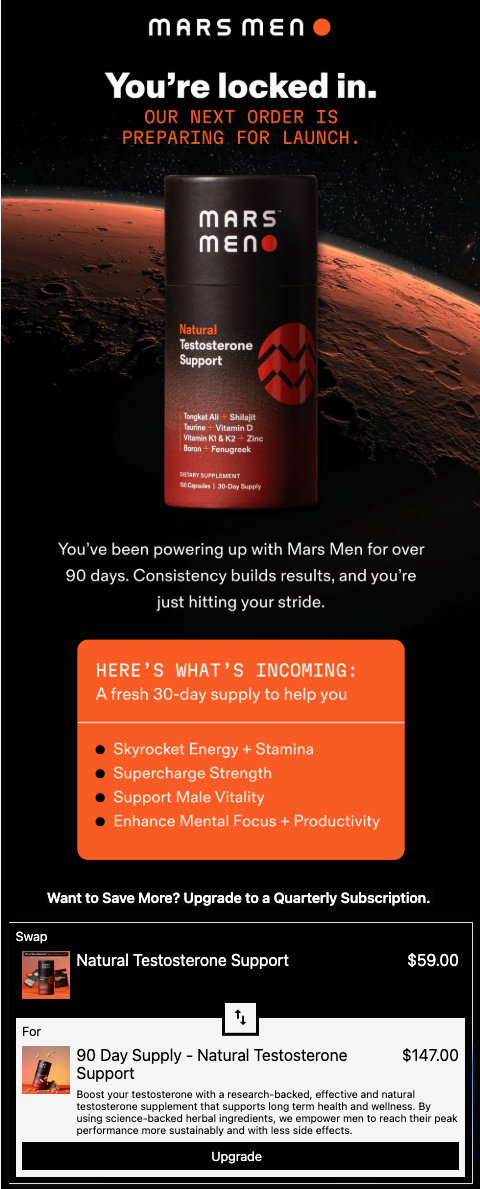
In-email upsells are only for subscription-based customers and "swap" a SKU or selling plan to a SKU or selling plan that is more valuable. Some example uses include:
Upselling from monthly to quarterly plans
Offering bundles that include items a customer is already subscribed to
The specific use cases other than the upcoming order email will be highly brand-dependent, but as a general rule, high-performing offers see between a 1% - 2% take rate.
What you'll be building:
Need ideas?
How to set up and use the swap-up block
To get the most out of Zaymo in promotional campaigns, make it a regular part of your campaign planning process and workflow.
Create your non-interactive template in Klaviyo
This template will be used as a fallback for customers who aren't able to view interactive emails
Identify opportunities throughout your customer journeys
Zaymo is built to work across flows and campaigns, with a focus on re-engaging current and past subscribers since they can complete actions 100% in-email
Purchase actions do not need to be attached to an upcoming order email
Build in Zaymo
Import your template from Klaviyo into Zaymo
Add the Zaymo block(s) into the email
The 📄 Swap upblock allows for multiple swap options to be configured. The first swap option in the list which applies to a given customer will be the one shown to them
If none of the swap options apply to the customer, the block will not be shown unless an "empty state" is configured. You have several approaches to handle unmapped subscriptions:
Use the same image from your fallback as the empty state (simplest approach)
Add a separate "static" product/grid section as a fallback and configure it to show only when no mapped offer applies
Create a product feed on the swap block with rules to display certain products, then configure a list of default products to display if none of the rules are met
Delete any repetitive or non-applicable elements
Customize the block to match your brand
Export back to Klaviyo
Click on "Preview / Export"
In the previewer, view the email and ensure that it looks as expected on desktop vs mobile, and Apple vs Gmail. You can also send yourself test emails to review
Once you're satisfied, export the template to Klaviyo
If you'd like to run an A/B test, export the template as an A/B test. More info here: 📄 How to use a Zaymo in-template A/B test
Add your new template into the flow or campaign
Examples & best practices
Annotated example
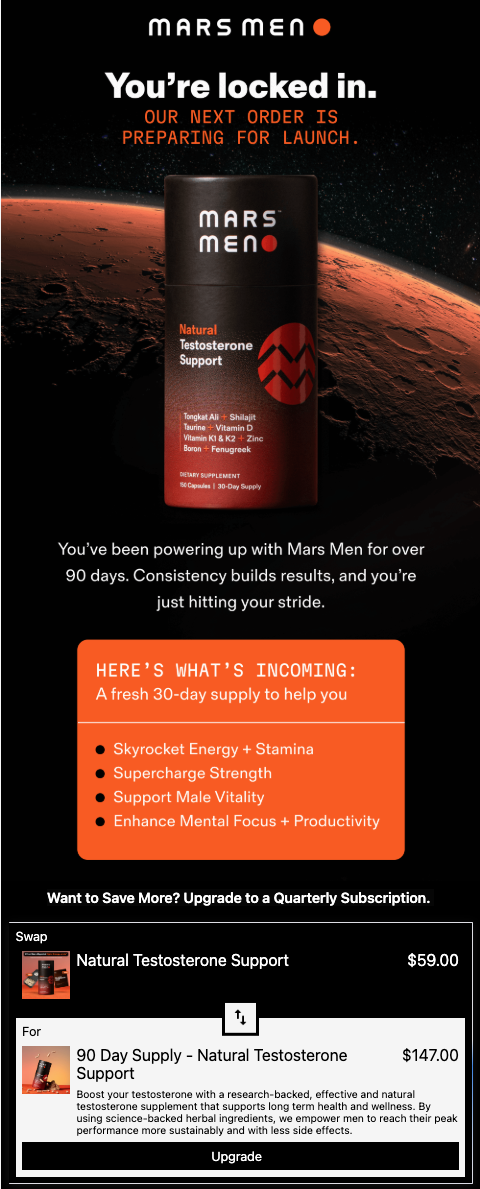 | Well-timed offers drive results: prompting a quarterly upgrade once a customer hits that milestone reinforces the value and savings they’re missing Keep your CTA singular and focused |
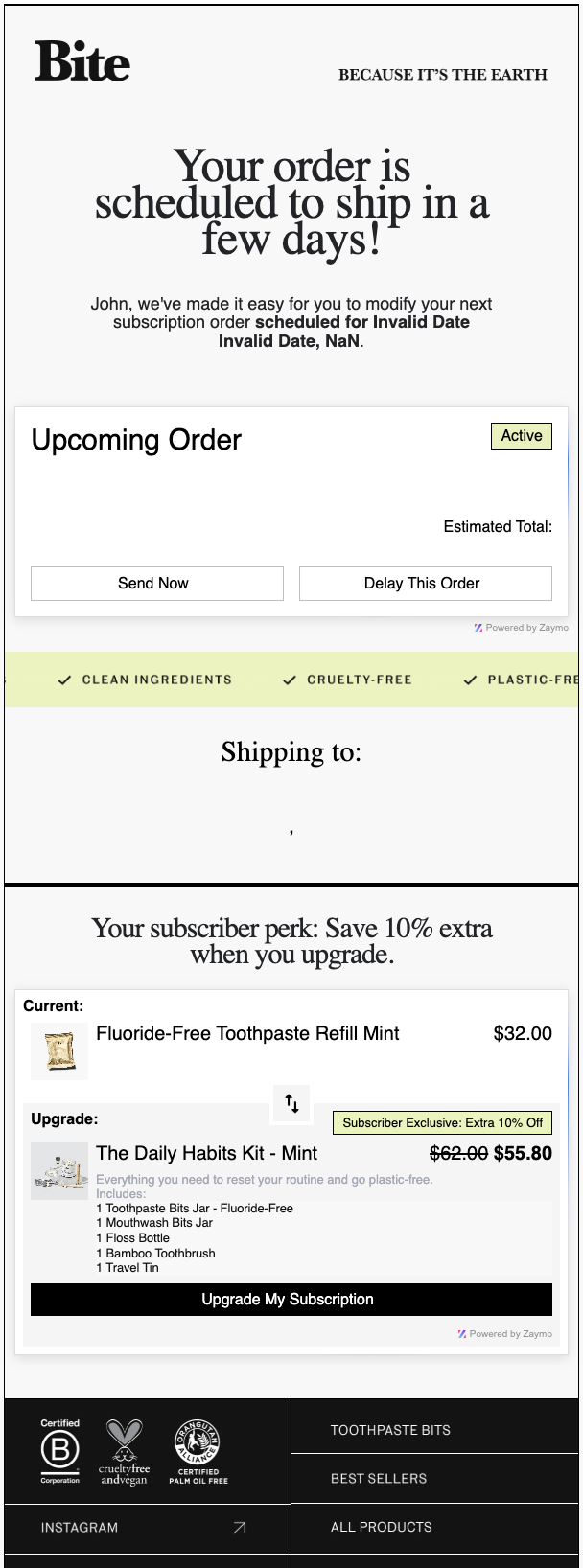 | For some brands, upselling can be more effective than cross-selling on upcoming order emails When offering bundles, highlight the fact that the bundle includes the customer's current subscription item(s) Applying a discount to your upsell can make it seem like a 'no-brainer' for customers |
Advanced use case: Tiered renewal offers
You can create tiered renewal offers for monthly and prepaid subscription plans using the Swap up block. For example, offer X% off + a free gift to customers renewing their 3-month plan.
Create a discount (in Zaymo or Shopify/subscription provider) that applies to the desired products and add it to the Swap up block
Point the Swap up block from the current plan to the new discounted plan
To add a free gift (like a mystery box): highlight the block, go to Content, select Additional actions, then add the free gift there
Leave the toggle for "maintain sales variant" ON so customers stay on the same plan duration (e.g., 3-month to 3-month)
Advanced use case: One-time flavor swaps for limited-time offers
You can implement one-time flavor swaps for subscribers using the Swap up block for limited-time promotional campaigns.
Use the Swap up block to initiate the flavor swap for your limited-time offer
Since it's a limited-time offer, you'll need to swap everyone back once the offer ends. This can be handled through:
Your subscription platform's journey feature (like Skio Journey)
Mass-swapping everyone back with custom code