Inbox booster
Last updated: August 7, 2026
The Inbox Booster helps more of your emails land in the primary inbox instead of the Promotions tab (or worse, spam). More inbox placement means more opens, more clicks, and more revenue from the sends you’re already making—without changing your content, list, or send schedule.
It works quietly in the background: Zaymo adds a small, invisible booster to your emails that improves how mailbox providers (Gmail, Apple Mail, Outlook, and others) classify and place them. You don’t design anything new—you just turn it on and watch your lift in the dashboard.
How it works
Deliverability is decided by the mailbox provider, not by you. Providers look at dozens of signals to decide whether a message lands in the inbox, the Promotions tab, or spam.
The Inbox Booster adds an invisible block to your email that strengthens those signals, nudging more of your messages into the primary inbox. It’s invisible to subscribers and doesn’t change how your email looks or reads.
How lift is measured (control group)
Because “deliverability went up” is easy to claim and hard to prove, Zaymo measures results with a built-in A/B holdout.
For every boosted send, we automatically hold out a small control group (about 10% of recipients) who do not receive the booster. We then compare the boosted group’s open rate against the control group’s open rate. The difference is your lift—the improvement caused by the booster, not seasonality or a strong subject line.
The control group keeps the numbers honest. It’s automatic, you don’t set anything up, and subscribers never notice.
Ways to use Inbox Booster
Automatic on Zaymo emails
If you build and export emails through Zaymo, the Inbox Booster is already included. Every Zaymo email you send is boosted and lift appears in your dashboard.
On any Klaviyo email (Inbox Booster Pro - paid version)
Pro lets you add the booster to any email in your Klaviyo account, including emails you didn’t build in Zaymo. You add a small Zaymo block to your templates once; sends that include the block are boosted and measured from then on.
Pro is a paid add-on. If you don’t see the setup controls, contact your Zaymo team to enable it.
Set up Inbox Booster Pro (paid version) in Klaviyo
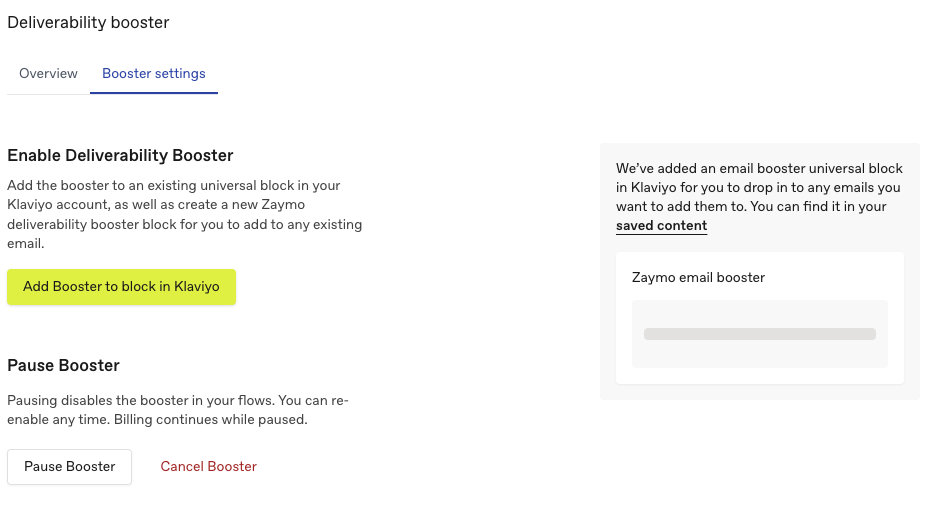
Open the Inbox Booster page in Zaymo and go to the Booster settings tab. There are two ways to add the booster to Klaviyo.
Option A: Add a ready-made booster block to saved content
This is the simplest path.
In Booster settings, click Add booster block.
Zaymo creates a ready-to-use “Zaymo Deliverability Booster” Universal Content block in your Klaviyo saved-content library and opens it.
In Klaviyo, drag that block into any email, flow, or campaign you want to boost.
Option B: Add the booster to an existing block
In Booster settings, click Add booster to block in Klaviyo.
Choose the Universal Content block you already use.
Copy the booster snippet and use the deep link to paste it into the right place in Klaviyo.
Make sure it’s included in the emails you care about
The booster only works on emails that contain the block. Add it to the flows and campaigns you want boosted.
The booster is forward-looking: it applies to sends after you add the block. Previously sent emails aren’t affected.
Measuring your lift
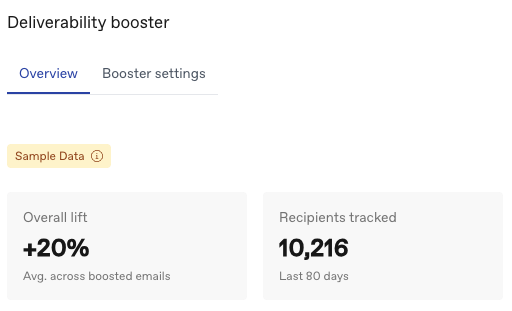
Open the Inbox Booster page and stay on the Overview tab.
You’ll see:
Overall lift: average open-rate lift across all boosted emails.
Recipients tracked: how many recipients we’ve measured (last 80 days).
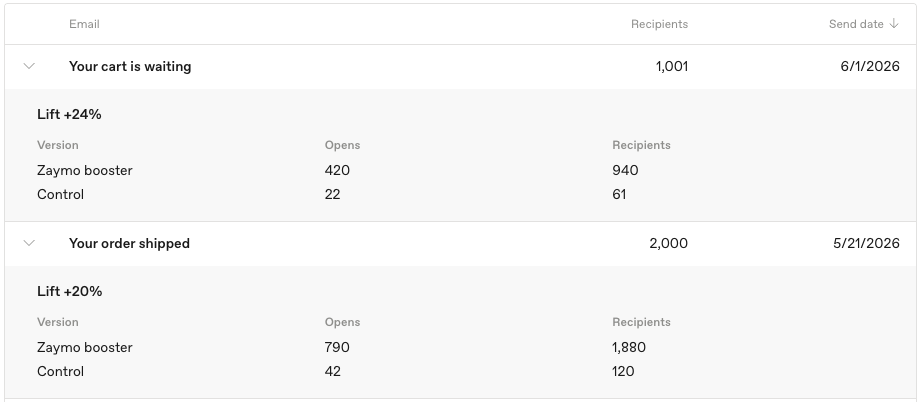
Per-email table: each boosted email with recipients and lift. Click a row to expand the breakdown (boosted opens vs. control opens).
How to interpret a lift number
Each email’s lift compares the boosted group’s open rate against that email’s holdout control.
A lift of +18% means boosted recipients opened about 18% more often than the control group for that send.
A “—” means there isn’t enough data yet (small send or too few opens). Zaymo waits for a meaningful sample before showing a number so you don’t react to noise.
When you’ll see data
New to the booster: until your first boosted emails send and accumulate opens, the Overview may show sample data. Real numbers replace it automatically.
Small sends take longer: lift needs both groups large enough to compare.
Not retroactive: only emails sent with the booster are measured.
Pausing, resuming, or canceling
From Booster settings:
Pause turns the booster off for new sends (content switch, not a billing change). Pro billing continues.
Resume re-enables the booster at any time.
Cancel ends Pro at the end of the current billing period. The booster continues working through the period you’ve paid for.
Requirements and troubleshooting
Klaviyo must be connected with the right permissions (reconnect if prompted).
The email must include the booster block (the most common reason a send isn’t boosted).
If you don’t see lift yet, confirm the email sent after you added the block and has reached enough recipients.
Open rates can be noisy for unrelated reasons; the control-group comparison isolates the booster’s true impact.
FAQ
Will subscribers see anything different? No—it's invisible.
Does it change who or when I send? No—only inbox placement.
Why does a small group not get the booster? That’s the control group (~10%), held out to measure lift. If you want to change this percentage, reach out to your Zaymo representative.
Can I use it on non‑Zaymo emails? Yes, through Inbox Booster Pro.
How fast are results? As soon as boosted emails send and accumulate opens.