How do I handle a validation error?
Last updated: July 10, 2026
A validation error is an error Zaymo surfaces when the current state of an email template will fail to render in Gmail. Zaymo warns you so you can take action before exporting the email.
What is the validation error
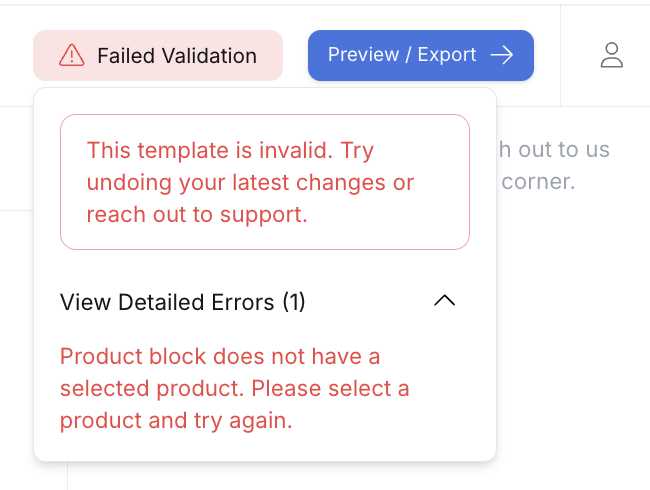
There is a red "Failed Validation" message that appears when Zaymo surfaces a validation error.
To get more information, click on the red Failed Validation warning message. It will say something like "This template is invalid. Try undoing your latest changes or reach out to support."
To see all the details, click on the View Detailed Errors accordion. You'll want to share the details in this dropdown with support if you reach out.
Most common reasons for validation errors
Product block missing selected product
Error message
Product block does not have a selected product. Please select a product and try again.
How to resolve
No need to reach out to support. Just add a product to the empty product block. How to choose products.
Failed to Transform Email
Error message
Failed to Transform Email
How to resolve
This error is often temporary and may resolve on its own. Try these steps:
Refresh the page and check if the error persists
Wait a few minutes and try again
Note: Validation errors that appear in preview typically do not affect live email delivery. Your live emails may continue to work normally even if you see this error in preview.
If the error persists after refreshing and waiting, reach out to Zaymo support.
Template is too large
Error message
The template is too large. AMP emails must be less than 200kb. Please reduce the size of the template by removing unused blocks and try again.
How to resolve
No need to reach out to support. Gmail has a hard cap on how large the interactive AMP portion of the email can be. Zaymo has implemented a 180KB safe limit with a 20KB buffer for any Klaviyo tags that get added. There is nothing you can change about the limit.
You can, however, follow Zaymo's best practices for minimizing interactive email size. How to minimize interactive email size.
Unsupported tags
Error message
Failed to process template. Please check for syntax errors or invalid expressions on the Klaviyo tags.
How to resolve
If you have intense Klaviyo tags built into the email, double-check the tags to make sure they are compliant. Make sure the email template rendered correctly before importing the template to Zaymo. Oftentimes, the issue Zaymo is detecting was already an issue in Klaviyo before the template was imported to Zaymo.
Missing URL for link elements
Error message
Missing URL for attribute href in tag a
How to resolve
This error occurs when an element has link formatting but no URL specified or is tied to an event. Follow these steps:
Edit the flagged element:
For any button or text link, add a valid URL in the Link/URL (href) field
If it's meant to be non-clickable, remove the link formatting or delete the empty link
Re‑validate by clicking Preview / Export
Common culprits include buttons without a URL, linked images with an empty link, or text that was highlighted and "linked" but left blank.
Check for double quotes in URLs: If you're still seeing validation errors after adding URLs, check whether your link contains double quotes within the URL or attributes. Double quotes inside link elements can cause validation failures. Replace any double quotes with single quotes to resolve the issue.
If you cannot identify the error, or fix the issue, message Zaymo support, and we will have an engineer find the unsupported tag in your email code and recommend a different way to do it.
Incomplete Dynamic Tags in URLs
Validation errors can occur when a URL contains an incomplete dynamic content tag — for example, a link that ends with an unclosed tag like &subscriptionId={{. Zaymo treats this as a syntax error.
Example:
Incorrect:
https://example.com/quick-action?stackId=123&subscriptionId={{Correct:
https://example.com/quick-action?stackId=123&subscriptionId={{ event.subscriptionId }}
Best practice: When inserting dynamic URLs — especially for subscription service quick action links — copy them directly from your subscription platform's documentation to avoid incomplete or malformed tag syntax. Always confirm that every opening {{ has a corresponding closing }}.
Unsupported CSS Dark Mode Media Feature
AMP email format does not support the prefers-dark-interface CSS media feature. If your template's stylesheet includes this, you will see an error similar to:
CSS syntax error in tag 'style amp-custom' - disallowed media feature 'prefers-dark-interface'Fix: Remove any dark mode media feature rules (e.g., @media (prefers-dark-interface)) from your template's CSS before uploading it to Zaymo.