How to use themes for block consistency
Last updated: March 11, 2026
Zaymo themes allow you to set default styling for blocks across all your emails, ensuring consistent branding without having to manually format each block every time you create a new email.
What are themes?
Themes are pre-configured styling settings that you can apply to blocks in your Zaymo account. Once you create a theme, any new blocks you add will automatically use that theme's formatting, including colors, fonts, button styles, and other design elements.
Creating and managing themes
To create or edit a theme, navigate to Settings > Global Theme.
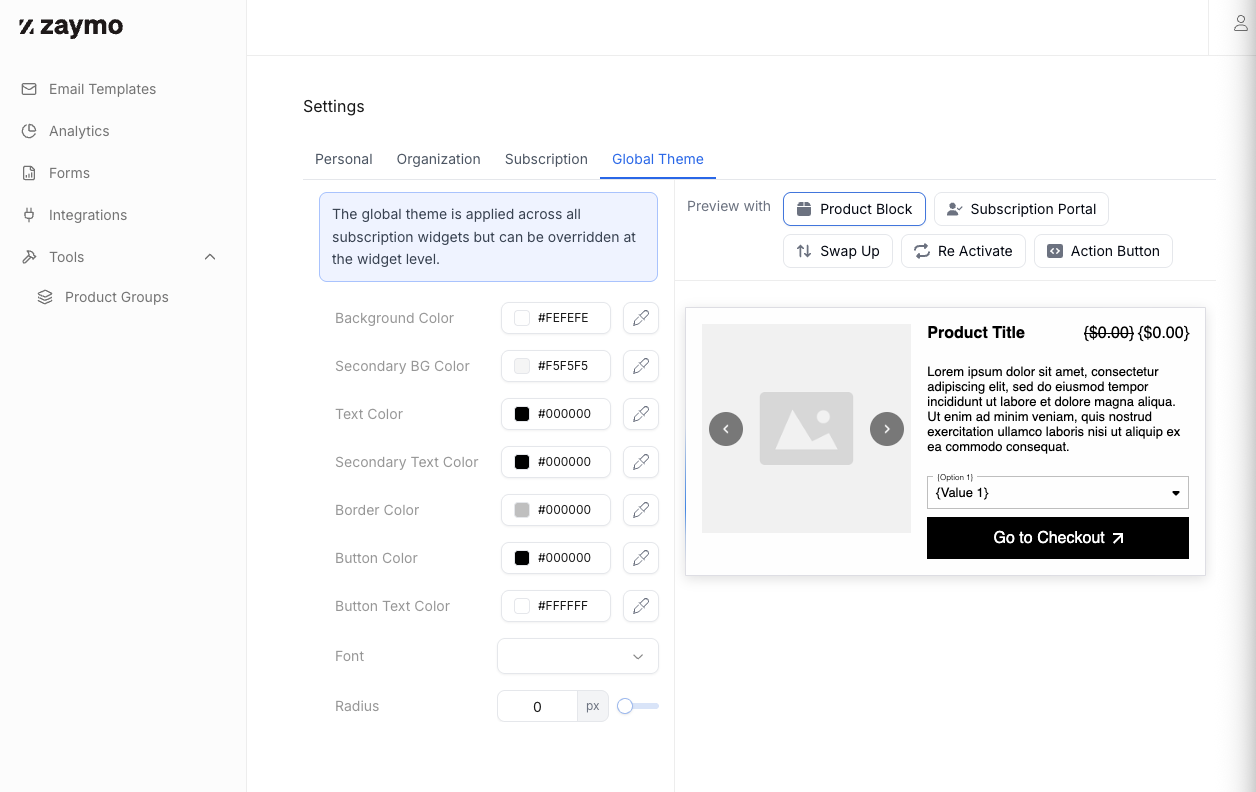
From there, you can:
Create a new theme with custom styling
Edit existing themes
Set a default theme for specific block types
Once a theme is applied to a block type, all future instances of that block will automatically use the theme's styling.
Key benefits
Save time: Stop recreating the same block formatting for every email
Brand consistency: Ensure all your emails maintain a cohesive look and feel
Easy updates: Change your theme settings once to update the default style for all future blocks
Known limitations
When using themes, keep in mind the following limitations:
Not retroactive: Themes only apply to blocks created after the theme is set. Existing blocks in previously created emails will not be updated automatically
Template duplication: If you duplicate a pre-existing email template, the blocks in that template will retain their original formatting rather than adopting the current theme settings
Unable to create multiple themes: We currently only support one theme at a time right now. We are working on a solution to have multiple themes.
Limited to 5 blocks: product block, subscription portal, action button, swap up, and reactivate
To apply your current theme to blocks in duplicated templates, you'll need to manually update the block styling.