Why am I seeing the fallback version in Gmail?
Last updated: July 29, 2026
If you are seeing the fallback version of a Zaymo email in Gmail, it is typically because of one of two reasons:
The email sender has not been approved by AMP
AMP MIME part size is too large
The email sender has not been approved by AMP
How to troubleshoot
Find out which email address you used to send the email
Navigate to Settings > Organization and check if that address is in the Approved Sending Addresses list
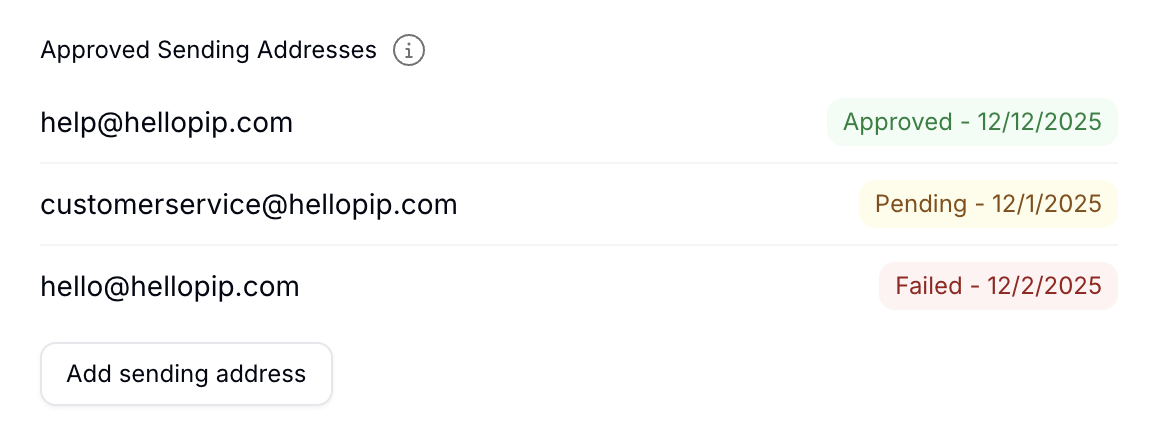
If the address shows, check if it is Approved or another status. If it is another status, you can reach out to support for an update
If the address does not show, you can trigger an approval with the Add sending address button
If the address is approved, this is not the reason your email is rendering the fallback in Gmail
Why?
Gmail only renders interactive content from email addresses that have gone through their approval process. If an unapproved email address sends an interactive email, Gmail renders the fallback in its place.
Important: AMP approval is required per sending email address. If you change your sending address (e.g., from hello@test.com to welcome@test.com), the new address will not have AMP approval and emails will show the magic link version instead. To get AMP approval for a new sending address, go into account settings and add the additional sending address. Google can take up to 2 weeks to process the AMP approval application.
Zaymo automatically applies on behalf of your primary sender address in Klaviyo when you integrate Zaymo with Klaviyo.
Read more on AMP approvals here.
AMP MIME part size may be too large
How to troubleshoot
Go the the template in Zaymo
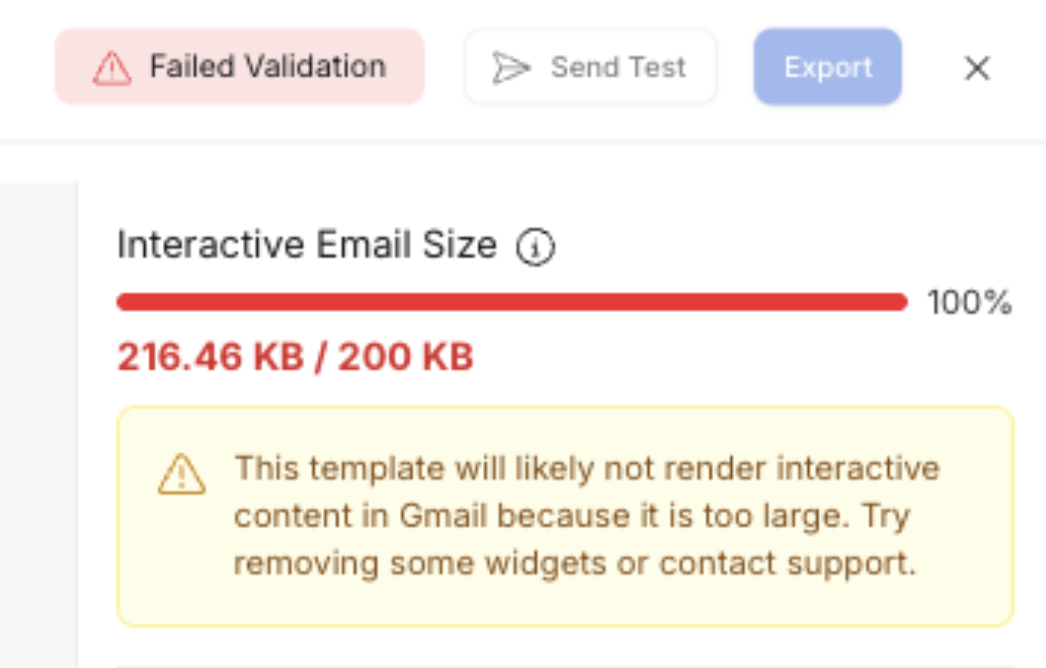
Check if the interactive email size is within ~20 KB of the 200 KB limit
If it is, your email is likely too large--especially if sent from a flow that uses customer data or if the template contains significant dynamic content
Dynamic email is disabled or blocked
How to troubleshoot
Check that "Enable dynamic email" is turned on in Gmail Settings > General
If on a company Google Workspace account, confirm with IT that dynamic email is not disabled organization-wide (admin settings override individual user preferences)
If signed into multiple Google accounts, verify they're viewing the email in their primary/default account (AMP only renders on the default account)
Temporarily disable browser extensions like ad blockers, Privacy Badger, or uBlock Origin to test if they're interfering with AMP rendering
Try signing out of Gmail completely and signing back in (enabling dynamic email sometimes requires a full session refresh)
Why?
Even when "Enable dynamic email" is toggled on in Gmail settings, several user‑environment factors can prevent AMP content from rendering. Google Workspace admins can disable dynamic email organization‑wide, overriding individual user settings. Browser extensions that block scripts or ads can interfere with AMP rendering. Additionally, Gmail may require a full sign‑out/sign‑in cycle after enabling dynamic email for the setting to take effect.
How to reduce email size
If your email is approaching or exceeding the 200 KB limit, try these solutions:
Remove empty blocks: Check for any product blocks, carousels, or other content blocks that don't have content added. Empty blocks still consume data space.
Reduce the number of products in carousels: Limit the number of products shown in product carousels to only what's necessary.
Why?
If the interactive portion of the email is greater than 200 KB, Gmail will default to the fallback version of the email.
Zaymo typically warns you of this in the builder with a failed validation error (see below). However, sometimes your email sender (like Klaviyo) adds additional content that puts the size over the edge.
Was the email sent as a live campaign through Klaviyo?
Zaymo has begun testing AMP content versus the magic link version. Half of Gmail users will see the magic link version, while the other half will receive the AMP version.