How do Zaymo blocks work across email clients?
Last updated: April 9, 2026
Zaymo blocks are designed to work seamlessly across all email clients, but the experience differs between interactive and non-interactive clients.
Support across clients
For the average consumer brand in the US, ~81% of email recipients will see the fully interactive version of the email. ~19% will see Zaymo blocks with magic links.
While you are waiting for AMP approval (~10 days after onboarding), Gmail behaves like a non-interactive email client. Once your email address receives AMP approval, emails in Gmail hosted inboxes will become interactive.
Zaymo blocks in interactive email clients
Interactive clients include Apple Mail, Gmail, and Yahoo. In these clients, all Zaymo blocks work with full interactivity—recipients can complete actions directly within the email without leaving their inbox.
Zaymo blocks in non-interactive email clients
Non-interactive clients include Outlook, Hotmail, ProtonMail, and others. For these clients, Zaymo displays the first screen of a given block with high fidelity to the designs you made in the builder.
Zaymo generates magic links for each action. If an end user clicks on a Zaymo block in a non-interactive email client, they will land on a confirmation page where they can make any changes to their action before confirming the action.
How do interactive blocks work in non-interactive email clients?
These blocks behave the same, but instead of completing actions inside the email, they redirect to a single confirmation page. Zaymo uses "magic links" to land email recipients in a pre-authenticated confirmation page for a given action. Read more about Zaymo magic links.
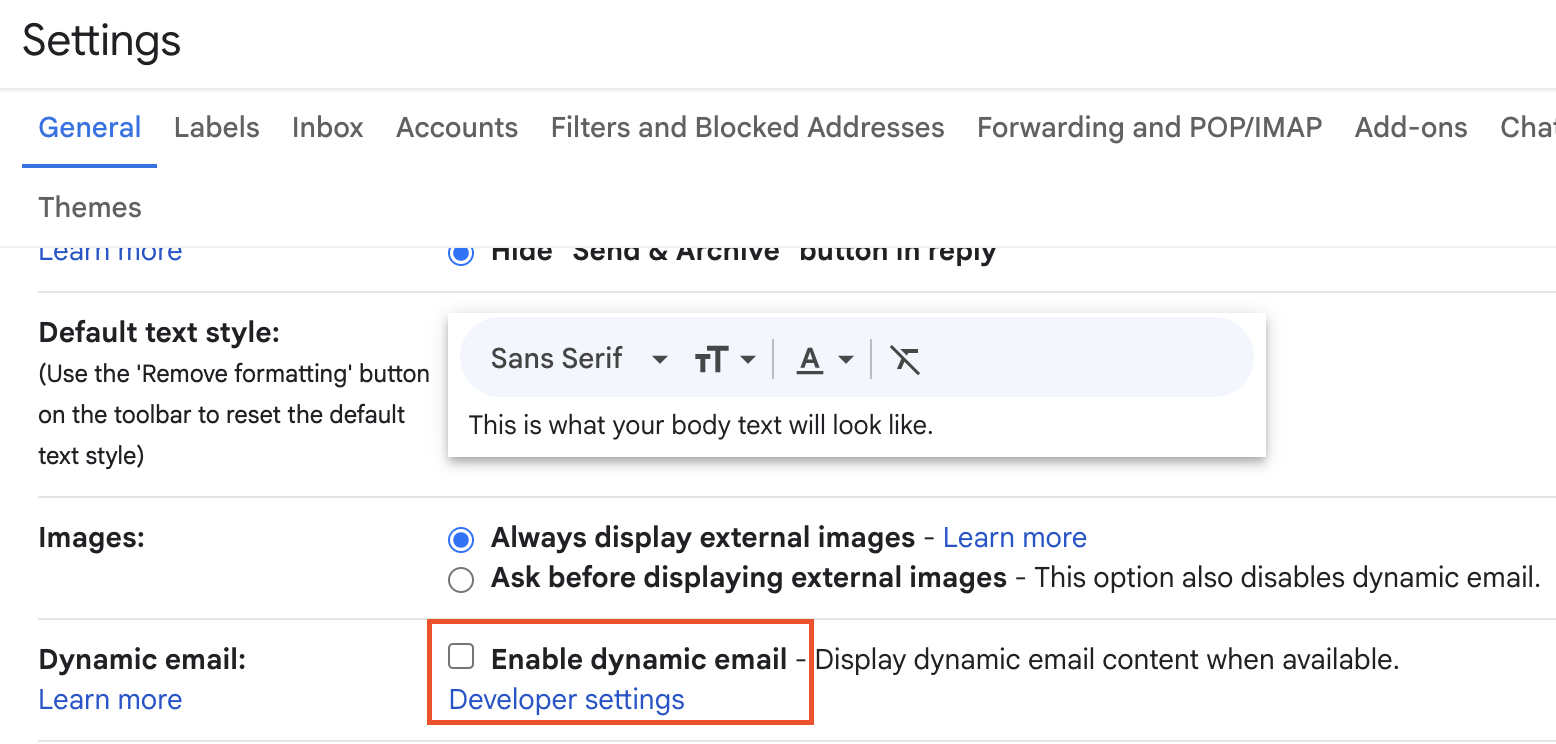
How do I preview non-interactive email clients if I have a Gmail account?
In Gmail's browser settings, turn off dynamic content to see the fallback version (remember to turn it back on when you want to view interactive emails)
How does each Zaymo block behave in non-interactive email clients?
Forms, reviews, and SMS blocks
These blocks display the first question of the form. When the magic link is clicked, recipients are taken to a hosted landing page where they can complete the interaction.
Subscription portal
Each action within the subscription portal has its own magic link. If a user selects Delay, they will be asked to confirm the delay. If they select Send now, they will be asked to confirm the accelerated send.
Products
Each product in a grid has its own magic link. For one-click purchases, the magic link will take the user to a confirmation of that purchase.
For email recipients without a card on file, the product will redirect the recipient to a pre-filled checkout page.
Action buttons
Default actions
The recipient will be directed via magic link to a confirmation page to confirm the action in the button.
Custom HTTP actions
When an email recipient clicks an Action button magic link that has a custom http action, the recipient will be directed to a hosted interactive version of the email. Their screen will auto-scroll to the position where the action button is in the middle of the screen.
The action will not be taken, and they will need to select the action button again
Why not a personalized confirmation page?
Because action buttons are so flexible, they often rely on the context around them in the email. So, to preserve that context, we land the email recipient on a hosted version of the interactive email.
Image carousel
The image carousel generates a GIF that auto-swipes with a 2-second delay in between each image. At the moment, that timing cannot be edited
Flip to reveal
The recipient lands on a page via magic link that hosts the flip to reveal block
Click to reveal
The recipient lands on a page via magic link that hosts the click to reveal block
Open animations
There is no open animation experience in non-interactive email clients
Known limitations of the magic link landing page
Landing page customization: The landing page is currently not editable
Product grids: Product grids display as static grids only, with no carousel functionality
Form elements: Dropdowns and checkboxes are not available in non-interactive email clients
Interactivity: All interactive elements are removed from the email itself. Interactivity resumes once the recipient reaches the landing page
Undo functionality: There is no undo option on the landing page because actions requires two-click verification
Styling: There are style limitations for the foreseeable future
Previous builder experience
Previously, Zaymo supported two builder states: one for the interactive email and one for the fallback. We merged these builders to provide:
Better user experience: One unified building process
Time savings: No need to maintain two separate versions
Simplicity: No need to remember to create fallbacks
Automatic compatibility: All Zaymo blocks now include built-in non-interactive versions