Parts of an interactive email--interactive vs fallback
Last updated: June 8, 2026
Intro
Interactive emails do not render in every email inbox. While Zaymo does its best to serve interactive emails in as many places as possible, there will always be a few inbox providers that prefer static emails.
Zaymo manages the display of interactive and non-interactive emails on your behalf, you can send Zaymo emails to your entire email list. In this article you’ll learn about the different layers in a Zaymo email and in which inboxes those layers render the best.
What are the two parts of an interactive email?
Each Zaymo template contains two versions of the email: the interactive version and the non-interactive version. Zaymo combines these versions into one template and handles which version email recipients see.
While there are technically 3 versions of the email (AMP, interactive HTML/CSS, and classic HTML/CSS), this article will group AMP and interactive HTML/CSS into a single "interactive version" of the email
Interactive version
The interactive version allows recipients to engage directly within the email. The interactive version is powered by both AMP for email and a special combination of HTML/CSS.
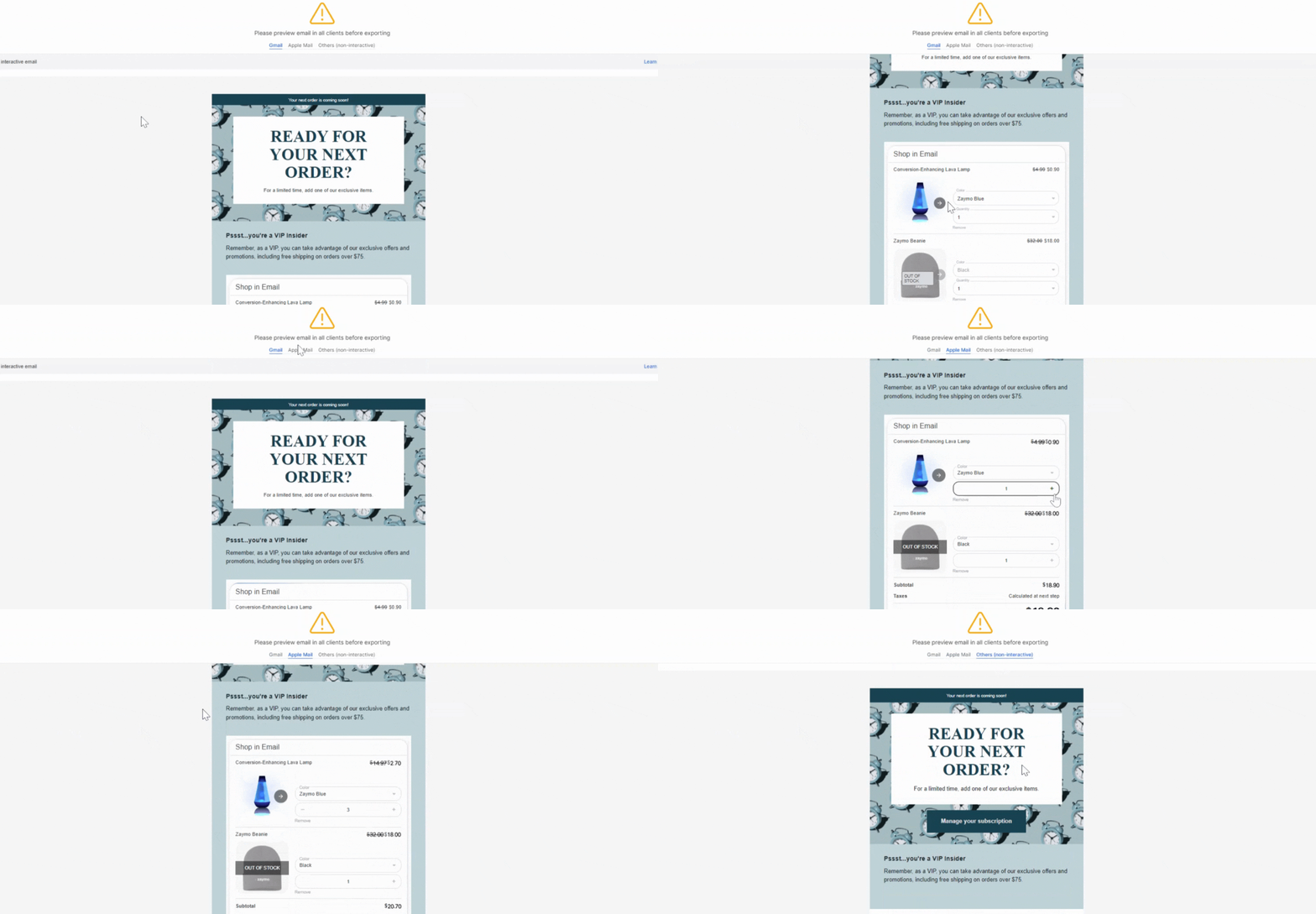
AMP for email - powers interactivity for clients like Gmail & Yahoo
Interactive HTML/CSS - powers interactivity for clients like Apple Mail
There are slight differences in user experience between AMP and interactive HTML/CSS, but they are fairly immaterial.
Non-interactive version
While Zaymo is able to render interactive emails in the vast majority of inboxes, some inboxes neither support AMP nor interactive HTML/CSS. Zaymo controls for this by having "magic links" which take customers to a hosted page where they can interact with the blocks like an interactive email.
Note: Zaymo text boxes do not support adding hyperlinks directly. If you need to add or modify hyperlinked text, make those changes in your ESP first, then re-import the template to Zaymo.
How to preview the versions of a Zaymo email
To preview both versions of a template, go Email Templates. Open the desired template, and click on Preview / Export.
In the preview view, you can toggle between Gmail/Yahoo, Apple Mail, and Others (non-interactive). Both Gmail/Yahoo and Apple Mail views will show the interactive version of the email.
Important ESP preview discrepancy warning
When working with interactive emails, there's a critical difference between what you see in your ESP's preview and what recipients actually receive:
ESP Preview vs Actual Delivery:
ESP previews (like Klaviyo's template preview) will show the non-interactive version
When you send test emails to Gmail or Apple Mail, recipients will see the interactive version
This discrepancy is expected behavior
Best practice:
Using your ESP's preview to validate the non-interactive version
Sending test emails to Gmail/Apple Mail accounts to validate the interactive version
Using Zaymo's preview tool to see exactly how each version will appear
This ensures your email displays correctly for all recipients, regardless of which version they receive.
Inbox providers (email clients)
For the average consumer brand in the US, ~81 percent of email recipients will see the interactive version of the email. As of the writing of this article, interactive emails are supported by the following providers.
Apple Mail: 45% of US consumers
Gmail + Yahoo: 36% of US consumers
Outlook, Hotmail, and others make up the remaining 19% of the market.

Domain vs inbox provider
The version of the email a recipient receives is decided by the inbox provider rather than the domain provider. While they can be the same, they are often different.
Domain providers provide the user with an email address. Inbox providers let the user view emails. For example, even if the majority of your customers have an @gmail.com address, our data shows that most of those users will use Apple Mail to view their emails.
Device support
Zaymo interactive emails renders on both mobile and desktop. The device that the email is opened on doesn’t affect which version of the email renders. Rather, the inbox provider that the email is viewed in can impact which version renders. If an email is viewed in an inbox provider that doesn’t support interactive emails, then the static fallback will render as described above.